محمل إقلاع
.png)
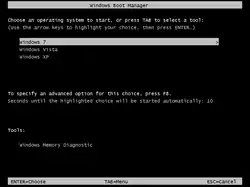
محمل إقلاع (بالإنجليزية: Bootloader)[1][2] هو برنامج حاسوب مسؤول عن إقلاع الحاسوب. كما يوفر أحيانًا قائمة تفاعلية تحتوي على خيارات تمهيد متعددة، فغالبًا ما يُطلق عليه اسم مدير الإقلاع (بالإنجليزية: Boot Manager).[2]
عند إيقاف تشغيل حاسوب، فإن برمجياته -تتضمن أنظمة التشغيل ونصوص تطبيقات برمجية وبيانات- تظل مخزنة على ذاكرة غير متطايرة. عند تشغيل الحاسوب، فإنه نموذجيًا لا يحتوي على نظام تشغيل أو أداة تحميله في ذاكرة الوصول العشوائي. فيقوم الكمبيوتر أولًا بتنفيذ برنامج صغير نسبيًا مخزن في ذاكرة القراءة فقط (لاحقًا ذاكرة قراءة فقط قابلة للبرمجة والمسح الكهربائي، ذاكرة وميضية) مع بعض البيانات المطلوبة، لتهيئة ذاكرة الوصول العشوائي (خاصة على أنظمة x86)، للوصول إلى الجهاز غير المتطاير أو الأجهزة التي يمكن من خلالها تحميل برامج وبيانات نظام التشغيل إلى ذاكرة الوصول العشوائي.
قد تقوم بعض أنظمة الكمبيوتر السابقة، عند تلقي إشارة تمهيد من مشغل بشري أو جهاز طرفي، بتحميل عدد صغير جدًا من التعليمات الثابتة إلى الذاكرة في موقع محدد ثم تهيئة وحدة معالجة مركزية واحدة على الأقل ثم توجيه وحدة المعالجة المركزية إلى التعليمات وبدء تنفيذها. تبدأ هذه التعليمات عادةً عملية إدخال من بعض الأجهزة الطرفية. قد ترسل أنظمة أخرى أوامر الأجهزة مباشرة إلى الأجهزة الطرفية أو وحدات تحكم الإدخال/الإخراج التي تنفذ عملية إدخال بسيطة للغاية (مثل "قراءة القطاع صفر من جهاز النظام إلى الذاكرة بدءًا من الموقع 1000")، مما يؤدي إلى تحميل جزء صغير من تعليمات محمل الإقلاع إلى الذاكرة بفعالية؛ ويمكن بعد ذلك أن ترسل وحدة المعالجة المركزية إشارة اكتمال من جهاز الإدخال/الإخراج لبدء تنفيذ التعليمات.
غالبًا ما تستخدم الحواسيب الصغيرة آليات تحميل إقلاع أقل مرونة لكنها أكثر تلقائية لضمان بدء تشغيل الحاسوب بسرعة وبتكوين برنامج محدد مسبقًا. في العديد من الحواسيب المكتبية، على سبيل المثال، تبدأ عملية الإقلاع مع وحدة المعالجة المركزية التي تقوم بتنفيذ البرنامج الموجود في ذاكرة القراءة فقط (على سبيل المثال، النظام الأساسي للإدخال والإخراج لحواسيب آي بي إم الشخصية أو آي بي إم متوافق) على عنوان محدد مسبقًا (بعض وحدات المعالجة المركزية، بما في ذلك سلسلة إنتل x86، مصممة لتنفيذ هذا البرنامج بعد إعادة التعيين دون مساعدة خارجية). يحتوي هذا البرنامج على وظائف بدائية للبحث عن الأجهزة المؤهلة للمشاركة في التمهيد، وتحميل برنامج صغير من قسم خاص (الشائع قطاع الإقلاع) للجهاز الواعد، وعادةً ما يبدأ عند نقطة إدخال ثابتة مثل بداية قطاع.
إقلاع الشبكة
معظم الحواسيب قادرة على الإقلاع عبر شبكة الحاسوب. حيث يُخزن نظام التشغيل على قرص خادم وتُنقل أجزاء معينة منه إلى العميل باستخدام بروتوكول بسيط مثل بروتوكول نقل الملفات البسيط. وبعد أن يتم نقل هذه الأجزاء، يتولى نظام التشغيل التحكم في عملية التمهيد.
أنظر أيضا
- إقلاع (حاسوب)
- مقارنة بين محمل الإقلاع
مراجع
- ↑ "GNU GRUB - GNU Project - Free Software Foundation (FSF)". www.gnu.org. مؤرشف من الأصل في 2013-07-09. اطلع عليه بتاريخ 2021-09-27.
- 1 2 "systemd-boot". www.freedesktop.org. مؤرشف من الأصل في 2024-05-14. اطلع عليه بتاريخ 2021-09-27.
- Duncan، Ray؛ Bostwick، Steve؛ Burgoyne، Keith؛ Byers، Robert A.؛ Hogan، Thom؛ Kyle، Jim؛ Letwin، Gordon؛ Petzold، Charles؛ Rabinowitz، Chip؛ Tomlin، Jim؛ Wilton، Richard؛ Wolverton، Van؛ Wong، William؛ Woodcock، JoAnne (1988). "Technical advisors". The MS-DOS Encyclopedia: versions 1.0 through 3.2 (ط. Completely reworked). Redmond, Washington, USA: Microsoft Press. ISBN:1-55615-049-0. LCCN:87-21452. OCLC:16581341.
{{استشهاد بكتاب}}: الوسيط|contributor=بحاجة لـ|contribution=(مساعدة) (xix+1570 pages; 26 cm) (NB. This edition was published in 1988 after extensive rework of the withdrawn 1986 first edition by a different team of authors. ) - Chappell، Geoff (يناير 1994). "Chapter 2: The system footprint". في Schulman، Andrew؛ Pedersen، Amorette (المحررون). DOS Internals. The Andrew Schulman programming series (ط. 1st printing, 1st). أديسون ويسلي . ISBN:978-0-201-60835-9.
{{استشهاد بكتاب}}: صيانة الاستشهاد: علامات ترقيم زائدة (link) (xxvi+738+iv pages, 3.5"-floppy ) Errata: - Rosch، Winn L. (12 فبراير 1991). "DR DOS 5.0 - The better operating system?". PC Magazine. ج. 10 رقم 3. ص. 241–246, 257, 264, 266. مؤرشف من الأصل في 2019-07-25. اطلع عليه بتاريخ 2019-07-26.
[…]
(NB. The source attributes this to theSYShas been improved under DR DOS 5.0 so you don't have to worry about leaving the first cluster free on a disk that you want to make bootable. The DR DOS system files can be located anywhere on the disk, so any disk with enough free space can be set to boot your system. […]SYSutility while in fact this is a feature of the advanced bootstrap loader in the boot sector.SYSjust plants this sector onto the disk.) - Paul، Matthias R. (2 أكتوبر 1997) [29 September 1997]. "Caldera OpenDOS 7.01/7.02 Update Alpha 3 IBMBIO.COM - README.TXT and BOOT.TXT - A short description of how OpenDOS is booted". مؤرشف من الأصل في 2003-10-04. اطلع عليه بتاريخ 2009-03-29.
- Paul، Matthias R. (17 يناير 2001). "FAT32 in DR-DOS". opendos@delorie. مؤرشف من الأصل في 2017-10-06. اطلع عليه بتاريخ 2017-10-06.
[…] The DR-DOS boot sector […] searches for the
IBMBIO.COM(DRBIOS.SYS) file and then loads the *whole* file into memory before it passes control to it. […] - Paul، Matthias R. (20 فبراير 2002). "Can't copy". opendos@delorie. مؤرشف من الأصل في 2017-10-06. اطلع عليه بتاريخ 2017-10-09.
[…] The DR-DOS boot sector loads the whole
IBMBIO.COMfile into memory before it executes it. It does not care at all about theIBMDOS.COMfile, which is loaded byIBMBIO.COM. […] The DR-DOS boot sector […] will find the […] kernel files as long as they are logically stored in the root directory. Their physical location on the disk, and if they are fragmented or not, is don't care for the DR-DOS boot sector. Hence, you can just copy the kernel files to the disk (even with a simplyCOPY), and as soon as the boot sector is a DR-DOS sector, it will find and load them. Of course, it is difficult to put all this into just 512 bytes, the size of a single sector, but this is a major convenience improvement if you have to set up a DR-DOS system, and it is also the key for the DR-DOS multi-OS LOADER utility to work. The إم إس-دوس kernel files must reside on specific locations, but the DR-DOS files can be anywhere, so you don't have to physically swap them around each time you boot the other OS. Also, it allows to upgrade a DR-DOS system simply by copying the kernel files over the old ones, no need forSYS, no difficult setup procedures as required for MS-DOS/PC DOS. You can even have multiple DR-DOS kernel files under different file names stored on the same drive, and LOADER will switch between them according to the file names listed in the BOOT.LST file. […] - Paul، Matthias R. (14 أغسطس 2017) [7 August 2017]. "The continuing saga of Windows 3.1 in enhanced mode on OmniBook 300". MoHPC - the museum of HP calculators. مؤرشف من الأصل في 2017-10-06. اطلع عليه بتاريخ 2017-10-06.
[…] the DR-DOS
FDISKdoes not only partition a disk, but can also format the freshly created volumes and initialize their boot sectors in one go, so there's no risk to accidentally mess up the wrong volume and no need forFORMAT /SorSYS. Afterwards, you could just copy over the remaining DR-DOS files, including the system files. It is important to know that, in contrast to إم إس-دوس/PC DOS, DR-DOS has "smart" boot sectors which will actually "mount" the file-system to search for and load the system files in the root directory instead of expecting them to be placed at a certain location. Physically, the system files can be located anywhere and also can be fragmented. […]
روابط خارجية
